
|
SDTools download and installation
 |
Individual installation procedure
SDT 7.6 is compatible with MATLAB 2018a (9.4) to 2024b (24.2). For earlier SDT see compatibility chart.
Currently compiled platforms are Windows (mexw64), Linux (mexa64).
For install
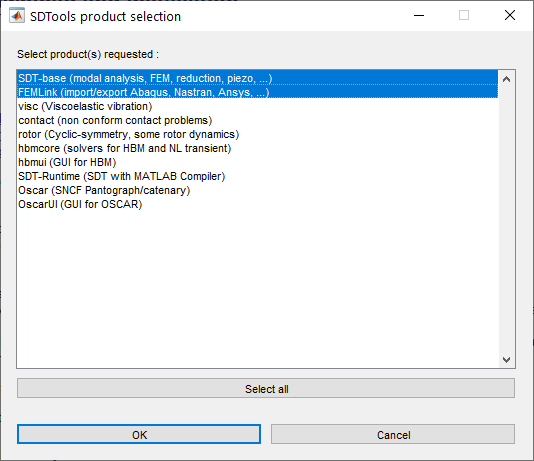
  cd /tmp % or wherever you unzipped the files
  % target='my_dir_location' % you may define the target here
  sdtkey install
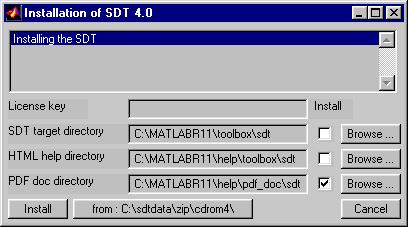
Upgrade procedure
If you want to preserve a previous copy of the SDT rename the $matlabroot/toolbox/sdt directory.
For upgrade from an earlier version above 7.2, you can now simply run sdtcheck patchupgrade For earlier SDT versions, you need to reinstall.
Multiple SDT or MATLAB installations
 pw0=pwd; cd('my_sdt_location'); % the SDT you want to use
 % cd(fullfile(matlabroot,'toolbox','sdt')) % is default
 sdtcheck('path');
 cd(pw0); clear pw0
  SDT_license_key=sdtdef('key'); % use your previous key
  sdtcheck('PathNone'); % clean paths of unused SDT
  cd /tmp % or wherever you downloaded sdt*_dis
  target='my_dir_location' % define the new target
  %target=fullfile(matlabroot,'toolbox','my_other_sdt');
  sdtkey install
  rehash toolboxreset % force clean the toolbox cache
and use the step above to switch between installations Admin/write permission problems
The default location fullfile(matlabroot,'toolbox','sdt') is typically protected by admin rights. If you do not have them,
 cd /tmp % or wherever you extracted sdt75.zip
 target='xxx' % select your target directory (cannot be the unzip directory)
 sdtkey install
 pw0=pwd;
 cd('target') % Replace target by the correct location
 sdtcheck('path');cd(pw0);clear pw0
 # edit these lines to appropriate values ####
 setenv MATLABROOT /usr/local/matlab
 setenv SDT ~/sdt

 cp -R $SDT $MATLABROOT/toolbox/sdt
 chmod -R a+rX $MATLABROOT/toolbox/sdt
 chmod -R a+x  $MATLABROOT/toolbox/sdt/*.mex*
Version compatibility. Supported platforms ?
The following lists supported MATLAB versions and platforms. To select a computer for use with SDT see see here.
| SDT version | Matlab version | Platforms |
| 7.6 | 24.2 (2024b) to 9.4 (2018b) | Windows 64, Linux Intel 64 |
| 7.5 | 24.1 (2024a) to 9.4 (2018a) | Windows 64, Linux Intel 64 |
| 7.4 | 9.12 (2022a) to 8.1 (2013a) (minor problems with 9.4 (2018b)). | Windows 64, Linux Intel 64 |
| 7.3 | 9.11 (2021b) to 8.1 (2013a) (minor problems with 9.4 (2018b)). | Windows 64, Linux Intel 64 |
| 7.1 | 9.6 (2018a) to 7.14 (2012a) (minor problems with 9.4 (2018b)). | Windows 64, Linux Intel 64 |
| 7.0 | 9.3 (2017b) to 7.14 (2012a) (minor problems with 9.4 (2018b)). | Windows 64, Linux Intel 64 |
| 6.8 | 9.0 (2016a) to 7.14 (2012a) | Windows 64, Linux Intel 64, MAC OS 64 |
| 6.7 | 8.5 (2015a) to 7.6 (2008a) | Windows 32 & 64, Linux Intel 64, MAC OS 64 |
| 6.6 | 8.3 (2014a) to 7.6 (2008a) | Windows 32 & 64, Linux Intel 64, MAC OS 64 |
| 6.5 | 8.0 (2012b) to 7.6 (2008a) | Windows 32 & 64, Linux Intel 64, MAC OS 64 |
| 6.4 | 7.14 (2012a) to 7.5 (2007b) | Windows 32 & 64, Linux Intel 64, MAC OS 64 (for earlier MATLAB or linux 32 please enquire) |
| 6.3 | 7.11 (2010b) to 7.1 | Windows 32 & 64, Linux Intel 32 & 64, Macintosh (32 & 64) |
| 6.2 | 7.10 (2010a) to 7.1 | Windows 32 & 64, Linux Intel 32 & 64, Macintosh (Intel) |
| 6.1 | 7.7 (2008b) to 6.5 (R13) | Windows 32 & 64, Linux Intel 32 & 64, Macintosh (G4 & Intel) |
| 6.0 | 7.4 (2007a) to 6.5 (R13) | Windows 32 & 64, Linux Intel 32 & 64, Macintosh (G4 & Intel), HPUX |

