PDF Index
|
Contents
Functions
PDF Index |
Purpose
Linearized rigid link constraints.
Description
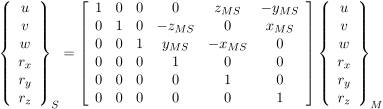
Rigid links are often used to model stiff connections in finite element models. One generates a set of linear constraints that relate the 6 DOFs of master M and slave S nodes by
| (9.25) |
Resolution of linear constraints is performed using fe_case or model assembly (see section 4.8.8) calls. The theory is discussed in section 7.14. Note that the master node of a rigid link has 6 DOF, even if the model may only need less (3 DOF for volumes).
If coordinate systems are defined in field model.bas (see basis), PID (position coordinate system) and DID (displacement coordinate system) declarations in columns 2 and 3 of model.Node are properly handled.
Although rigid are linear constraints rather than true elements, such connections can be declared using an element group of rigid connection with a header row of the form [Inf abs('rigid')] followed by as many element rows as connections of the form
[ n1 n2 DofSel MatId ProId EltId]
where node n2 will be rigidly connected to node n1 which will remain free. DofSel lets you specify which of the 3 translations and 3 rotations are connected (thus 123 connects only translations while 123456 connects both translations and rotations). The rigid elements thus defined can then be handled as standard elements.
With this strategy you can use penalized rigid links (celas element) instead of truly rigid connections. This requires the selection of a stiffness constant but can be easier to manipulate. To change a group of rigid elements into celas elements and set a stiffness constant Kv, one can do
model=feutil('SetGroup rigid name celas',model);
model.Elt(feutil('findelt group i',model),7) = Kv; % celas in group i
The other rigid definition strategy is to store them as a case entry. rigid entries are rows of the Case.Stack cell array giving {'rigid', Name, Elt}.
The syntax is
model=fe_case(model,'rigid',Name,Elt);
where Name is a string identifying the entry. Elt is a model description matrix containing rigid elements. Command option Append allows concatenating a new list of rigid constraints to a preexisting list in Case.Stack.
The call model=fe_case(model,'rigidAppend','Name',Elt1); would thus concatenate the previously defined list Name with the new rigid element matrix Elt1.
Using the fe_case call to implement rigid allows an alternative rigid constraint input that can be more comprehensive in some applications. You may use a list of the form [MasterNode slaveDOF slaveNode_1 slaveNode_2 ... slaveNode_i] instead of the element matrix. Command option Append is also valid.
The following sample calls are thus equivalent, and consists in implementing a rigid link between nodes 1 and 2, and 1 and 3 (with 1 as master) for all six DOF in a sample model:
model=fe_case(model,'rigid','Rigid edge',...
[Inf abs('rigid');
1 2 123456 0 0 0;
1 3 123456 0 0 0]);
% or
model=fe_case(model,'rigid','Rigid edge',[1 123456 2 3]);
In some cases, interactions with feplot visualization may transform the Elt matrix into a structure with fields Elt that contains the original data, and Sel that is internally used by feplot to display the rigid constraint on the mesh.
The following example generates the mesh of a square plate with a rigid edge, the rigid constraint is here declared as rigid elements
% generate a sample plate model
model=femesh('testquad4 divide 10 10');

% generate beam1 elements based on the edge
% of the underlying 2D model at x=0
elt=feutil('selelt seledge & innode{x==0}',model);
% remove element header from selection,
% we only use the node connectivity
elt=elt(2:end,:);
% assign the rigid element property
elt(2:end,3)=123456; % all 6 DOF are slave
% remove old data from the previous element selection
elt(2:end,4:end)=0;

% add rigid elements to the model
model=feutil('addelt',model,'rigid',elt);
% % alternative possible: define as a case entry
% model=fe_case(model,'rigid','Rigid edge',[Inf abs('rigid'); elt]);

% Compute and display modes
def=fe_eig(model,[6 20 1e3]);
feplot(model,def);fecom(';view3;ch8;scd.1');
The rigid function itself is only used for low level access by generating the subspace T that verifies rigid constraints
[T,cdof] = rigid(node,elt,mdof)
[T,cdof] = rigid(Up)
See also